AI
To make a music video, pick a concept that fits the song’s mood, plan your shots, film (or generate) the visuals, edit them to the beat, and export versions sized for YouTube, TikTok and Spotify. A simple music video can be planned, shot and edited in about two days. If you have no camera or crew, you can skip filming: an online tool such as Renderforest’s music video maker turns an MP3 into a finished visualizer, lyric or AI-generated video in under an hour.
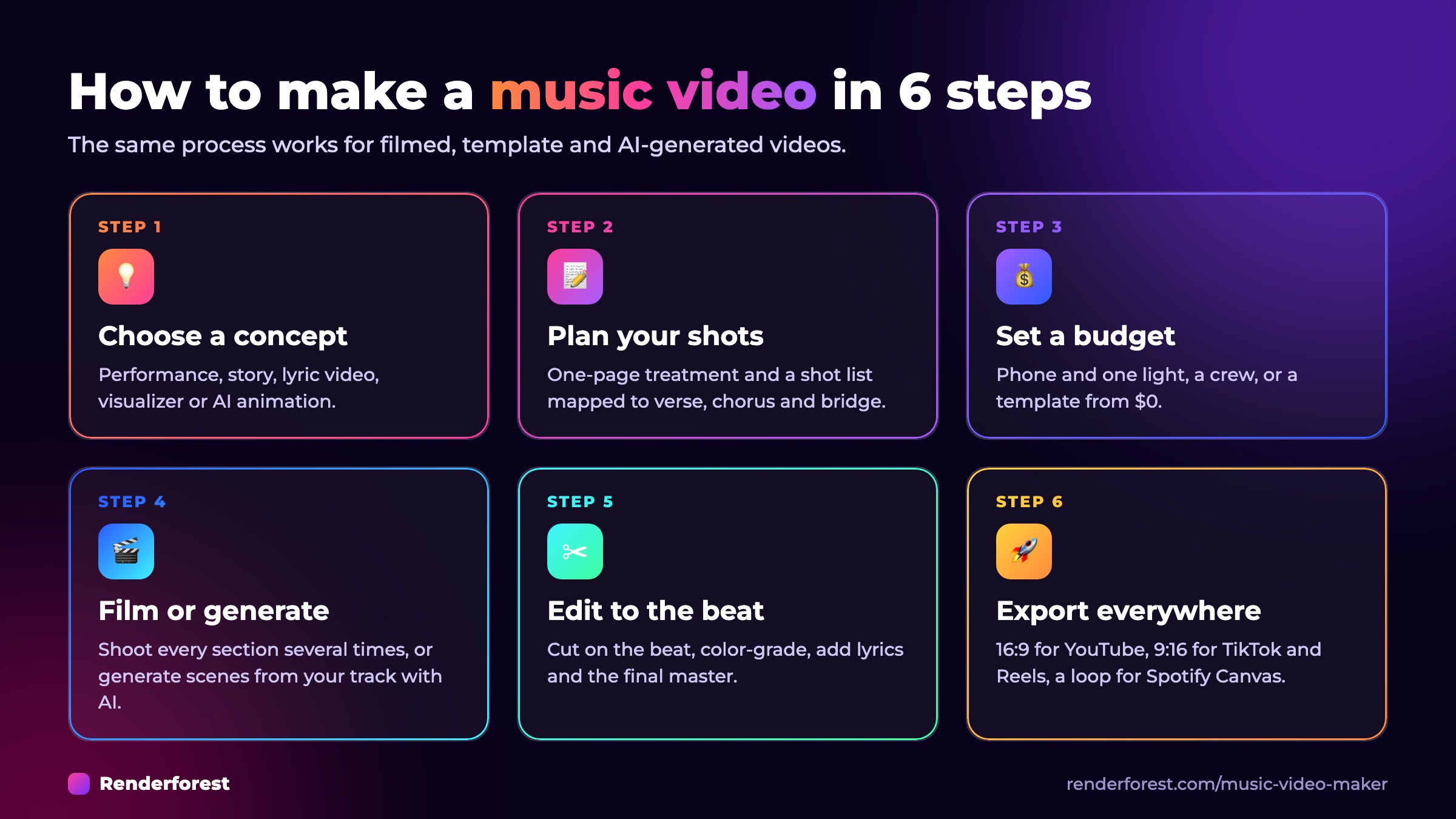
How to make a music video in 6 steps:
Make your music video now — free to start →
Free to start, no credit card. Since 2013, 40M+ creators have made 120M+ projects with Renderforest (rated 4.8 on Capterra and 4.7 on G2).
Key takeaways
A music video is a short film that pairs a song with visuals to promote it. It can show the artist performing, tell a story, display the lyrics, or animate the sound itself. Today most music videos are watched on YouTube, TikTok, Instagram and Spotify, often as short vertical clips cut from the full video.
A music video is still the strongest way to get a song discovered, because discovery now happens on video platforms. The numbers:
That is why one song now needs several videos, not one: a full video, short vertical teasers and a Canvas loop.
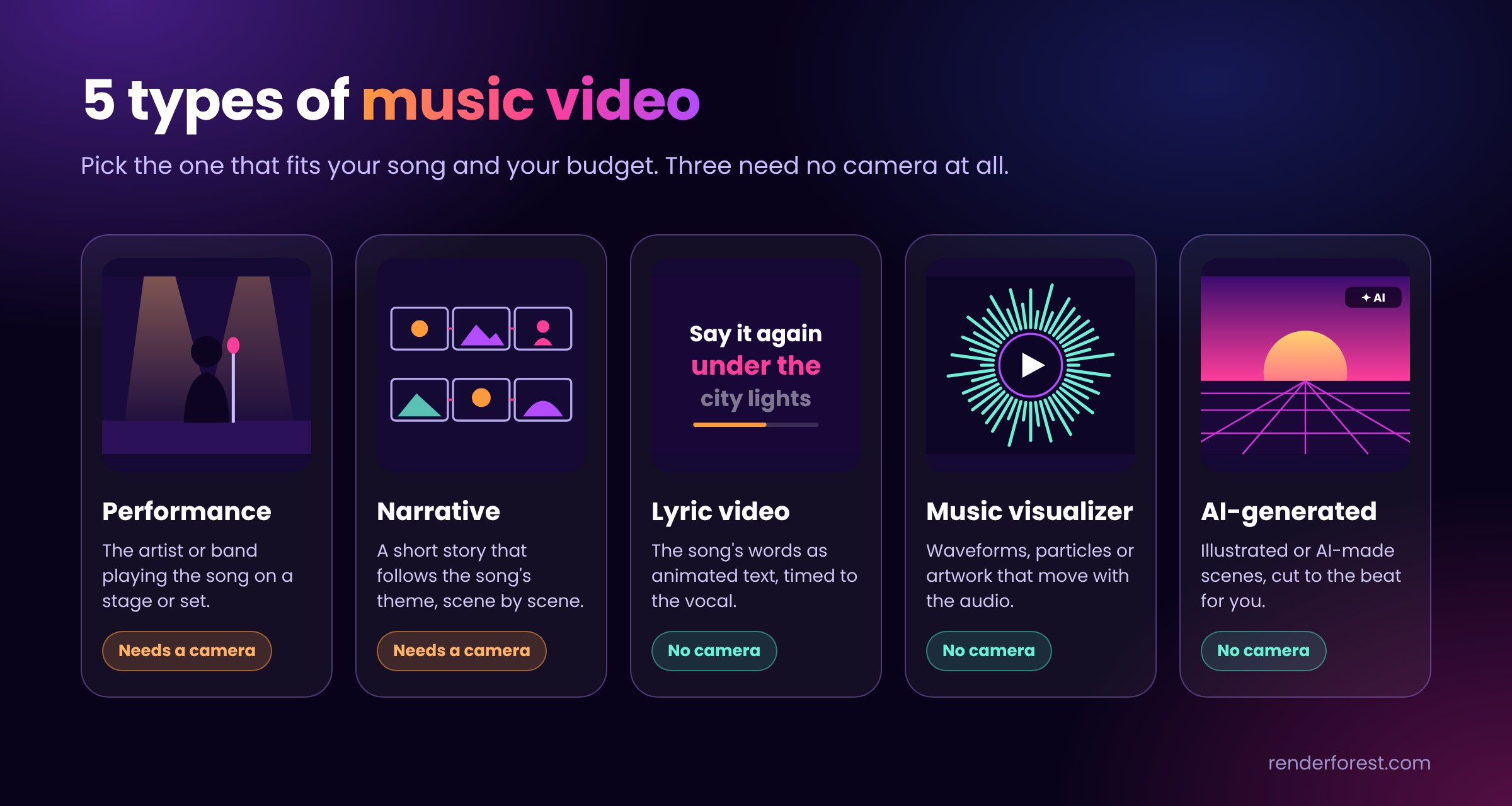
Pick the type that matches your budget and your song, not the most expensive one. Many independent artists release a lyric video or visualizer first, then a filmed video once a track gains traction.
| Type | What it is | Needs a camera? | Best for |
|---|---|---|---|
| Performance | The artist or band playing the song | Yes | Bands, live energy, rap |
| Narrative | A short story that follows the song’s theme | Yes | Emotional or story-driven songs |
| Lyric video | Animated lyrics timed to the vocal | No | Singles, sing-along hooks, release-day uploads |
| Music visualizer | Waveforms, particles or artwork that move with the audio | No | Electronic, lo-fi, podcasts, instrumental tracks |
| Animated / AI-generated | Illustrated or AI-made scenes cut to the beat | No | Concept-heavy songs, artists who prefer not to appear on camera |
Listen to the track several times and write down the mood, colors and images it brings up. The concept should match the feeling of the song more than its literal lyrics. Keep it to one sentence: “A night drive through an empty city that slowly fills with light” is easier to shoot than five unrelated ideas.
A treatment is a one-page pitch of the video: idea, look, locations and key moments. Turn it into a storyboard (rough sketches of each scene) and a shot list that maps every shot to a section of the song: intro, verse, chorus, bridge, outro. A good shot list prevents most problems on shoot day.
Decide what you will spend before you book anything. If money is tight, a recent smartphone, natural light and one strong location are enough. If you have some budget, spend it on lighting first; it improves image quality more than a new camera. If you don’t want to film at all, a template-based tool replaces this whole step.
Shortcut: a Renderforest plan starts at $9 a month billed annually, less than a single prop for most shoots, and removes the watermark from your exports.
Play the song out loud on set so performers can lip-sync to the real track. Shoot every section of the song several times from different angles: wide, medium and close-up. Record a few seconds before and after each take so you have room to cut. Test your lighting before the first take, not after.
No footage, or not enough of it? Generate the missing scenes with the AI music video generator, or skip filming entirely with a visualizer template.
Start with a rough cut that follows the shot list, then refine it. Cut on the beat or on strong vocal moments, so changes in the picture feel like part of the music. Color-grade all clips to one look, add titles or lyrics, and replace the camera audio with the final master track.
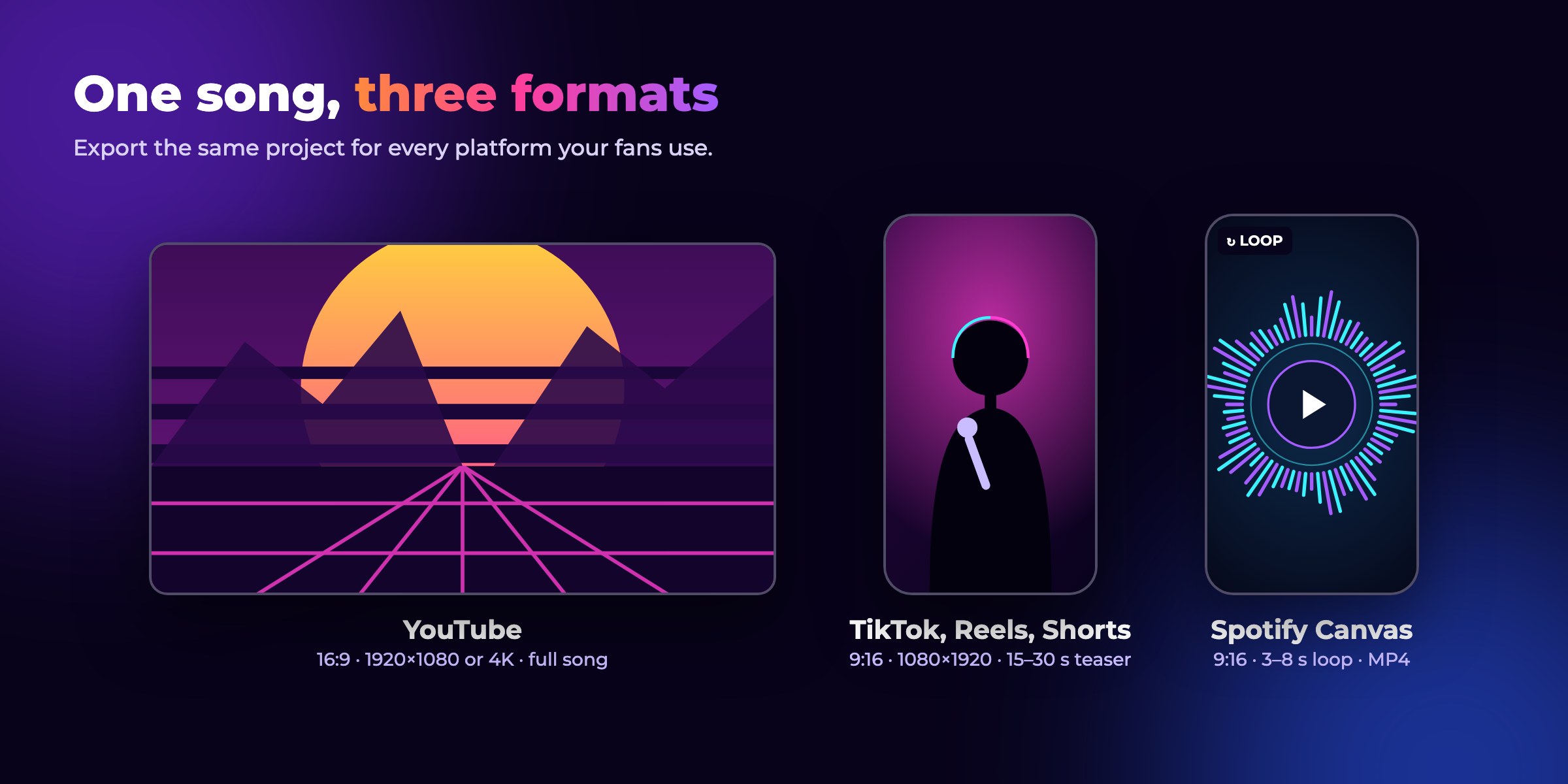
Export a 16:9 master in 1080p or 4K for YouTube. Then cut 15–60 second vertical clips (9:16) of the hook for TikTok, Instagram Reels and YouTube Shorts, and a 3–8 second loop for Spotify Canvas. Add a thumbnail, a keyword-rich title, the lyrics in the description, and links to streaming platforms.
Music video sizes by platform
| Platform | Aspect ratio | Recommended resolution | Length |
|---|---|---|---|
| YouTube (full video) | 16:9 | 1920×1080 or 3840×2160 | Full song |
| YouTube Shorts | 9:16 | 1080×1920 | Up to 3 minutes |
| TikTok | 9:16 | 1080×1920 | Up to 10 minutes in-app; 15–30 seconds works best for a teaser |
| Instagram Reels | 9:16 | 1080×1920 | Up to 20 minutes; over 3 minutes is not recommended to new audiences |
| Spotify Canvas | 9:16 | 720–1080 px tall, MP4 | 3–8 second loop; avoid singing or lip-sync shots |
In Renderforest you can export the same project in several aspect ratios, so one edit covers every platform.
Specs from official help pages, November 2026: YouTube Shorts, YouTube resolution, Instagram Reels, TikTok, Spotify Canvas.
You can make a music video without filming anything by using a music visualizer, a lyric video template, or an AI music video generator. These are the fastest options for independent artists, producers and podcasters who need a video on release day.
Which Renderforest tool fits your release?
| You have | You want | Use |
|---|---|---|
| A finished track and cover art | A YouTube upload on release day | Music visualizer templates |
| A track with a strong hook or lyrics | A sing-along video fans share | Lyric video templates in the music video maker |
| A track and a visual idea, no footage | A full story video with scenes cut to the beat | AI music video generator |
| Phone or camera footage | A polished edit with titles and effects | Online AI video editor |
| Any of the above | A looping clip for Spotify Canvas or TikTok | Export a short vertical cut from the same project |
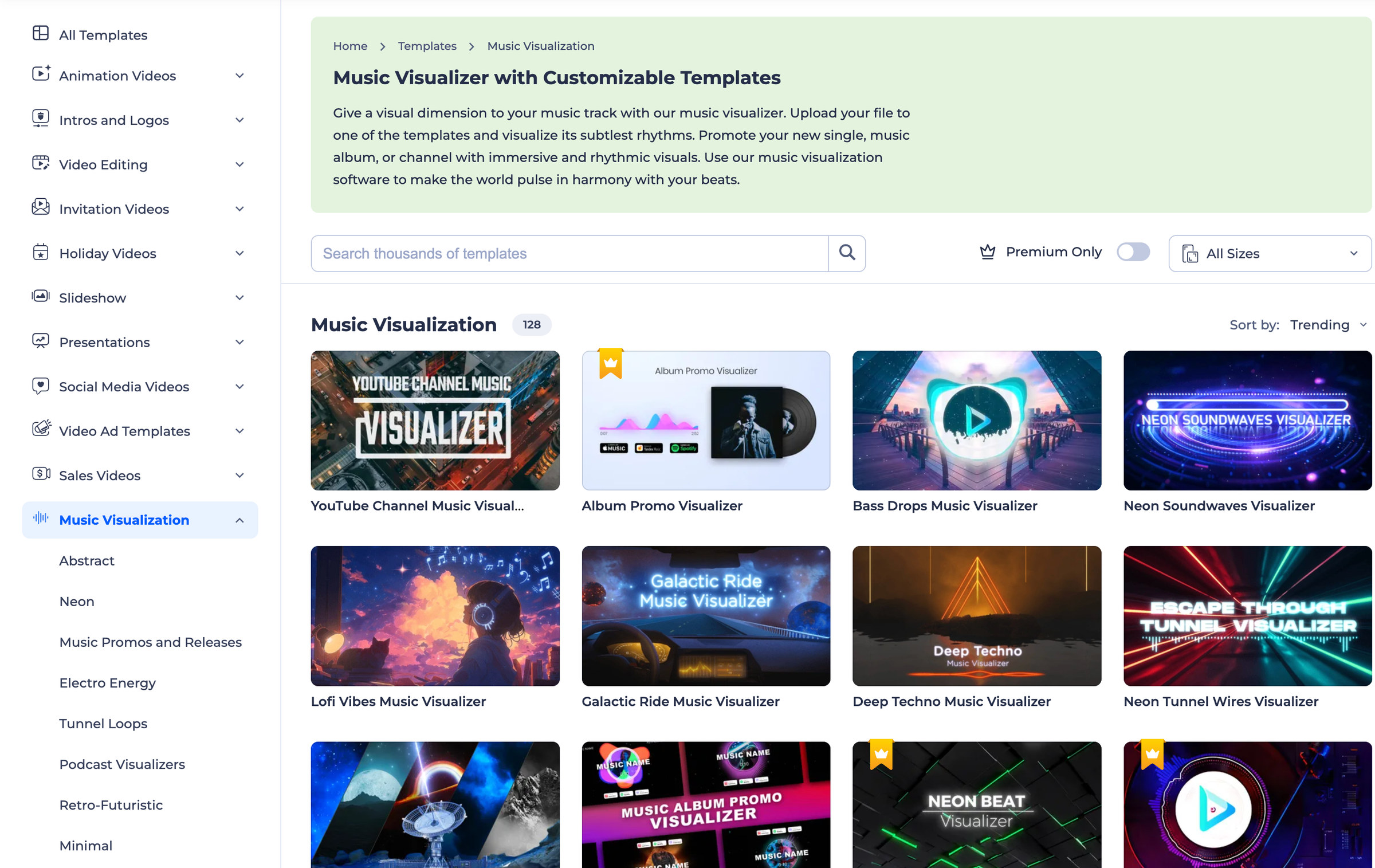
Renderforest’s music video maker turns an MP3 or WAV file into a video that moves with the track. The visualizer library has 128 templates, including Turntable, Neon Beat and Electro Dubstep, in styles such as waveform, spectrum bars, circular, particles and lyric typography.
Browse music visualizer templates →
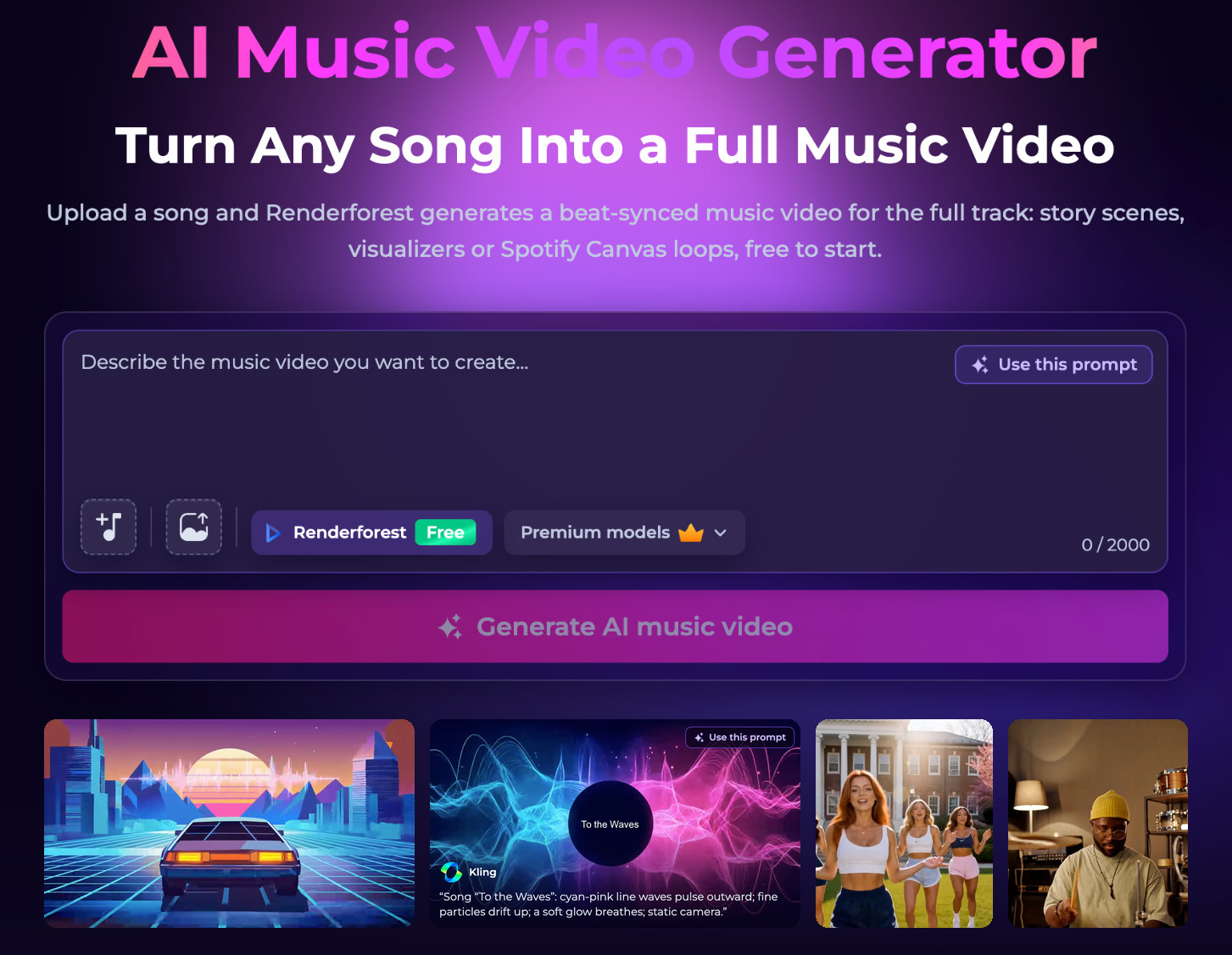
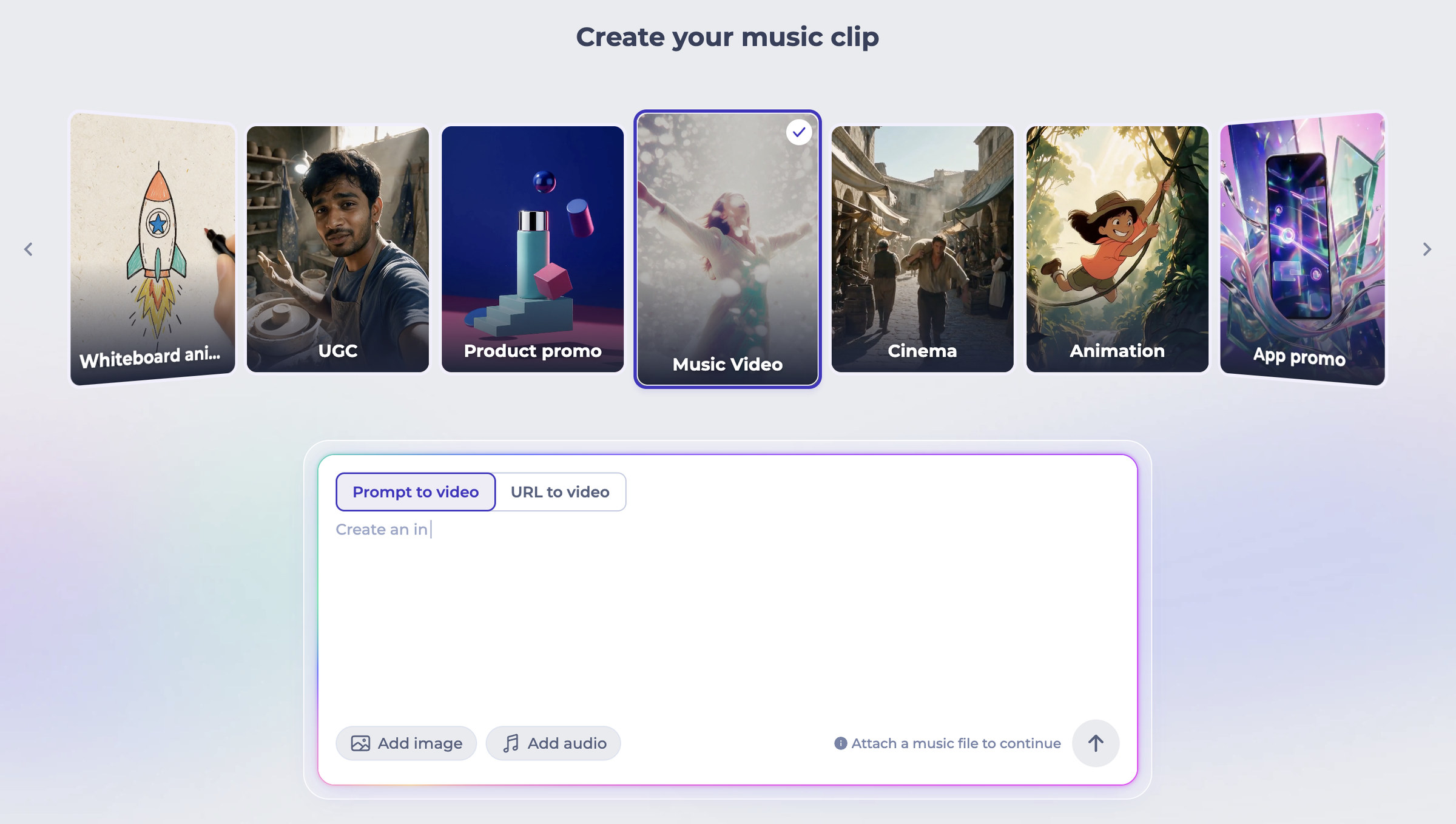
Renderforest’s AI music video generator builds a beat-synced video for the full track. It reads the song’s tempo, energy, transitions and lyrics first, generates a scene for each part, and cuts the scenes to the rhythm, with no manual keyframing. Tracks made in Suno or another AI music tool work the same way: export the audio and upload it.
One song gives you a whole release kit: the official video, 15–30 second TikTok and Reels teasers, a 3–8 second Spotify Canvas loop, and a full-length visualizer for YouTube.
Generate an AI music video from your song →
A lyric video shows the song’s words as animated text timed to the vocal, and it is often the first video artists publish for a new single. In Renderforest there are two ways to make one: start from a lyric-style template and swap in your words, or generate AI scenes from your track and turn on “Include subtitles” so the lyrics appear as editable text layers. Pick a font and motion style that fits the genre, then time each line to the beat.
You can build and preview a full video for free. Upgrade when you are ready to publish and earn from it.
| Free | Lite | Pro | Business | |
|---|---|---|---|---|
| Price (billed annually) | $0 | $9/mo | $19/mo | $39/mo |
| Watermark | Yes | No | No | No |
| Template export | 720p | 720p | 1080p | 4K |
| AI credits | Free credits to try | 1,000 per month | 2,400 per month | 6,000 per month |
| Premium AI models (Kling 3.0, Seedance 2.5) | Not included | Included, paid in credits | Included, paid in credits | Included, paid in credits |
| Commercial use | Personal use | Yes | Yes | Yes, with reseller licence |
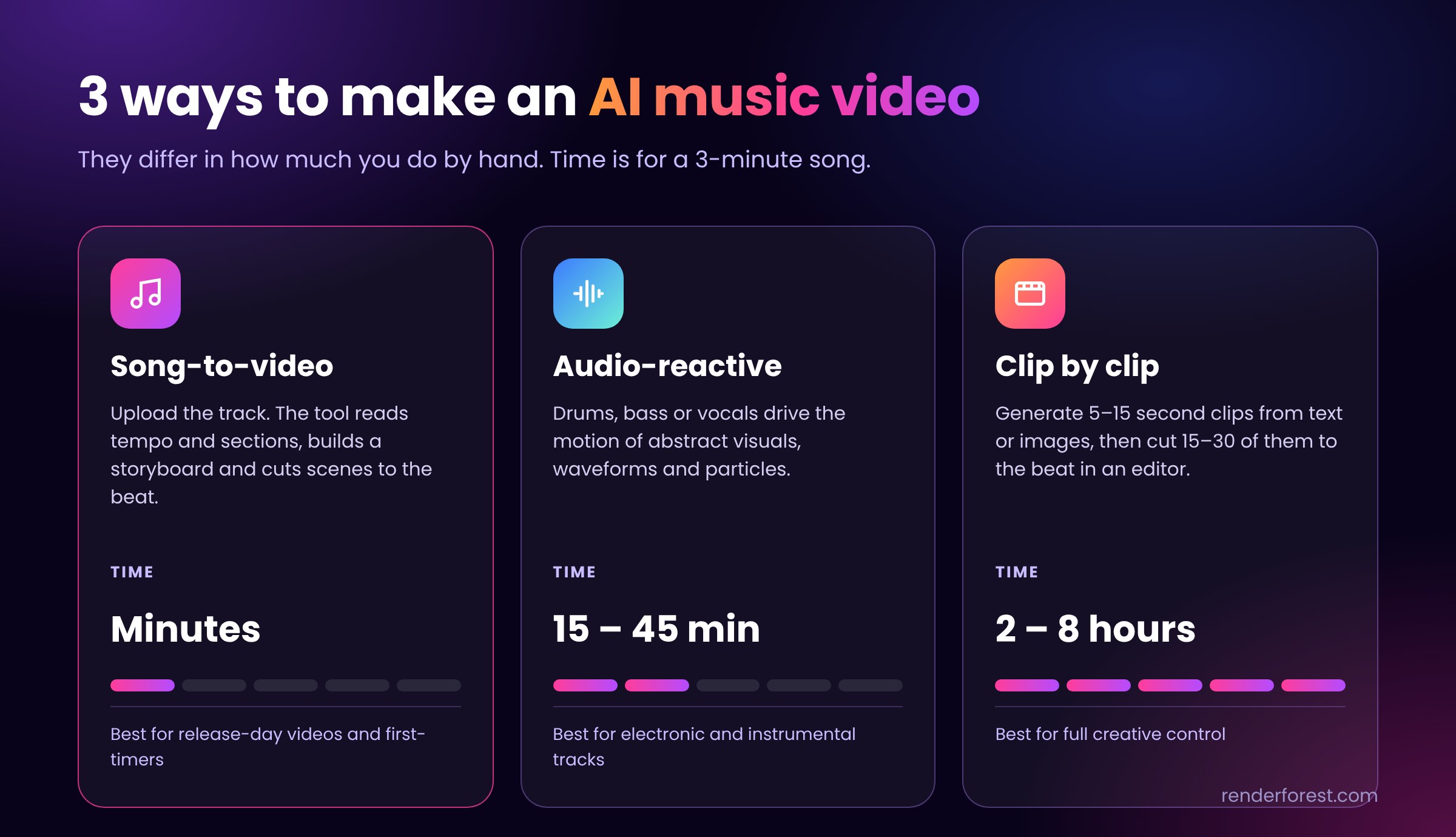
There are three ways to make an AI music video in 2026, and they differ mainly in how much work you do by hand. Most independent artists start with the first one.
| Workflow | How it works | Time for a 3-minute song | Best for |
|---|---|---|---|
| Song-to-video (automatic) | Upload the track; the tool reads tempo and sections, builds a storyboard and generates beat-synced scenes | Minutes | Release-day videos, artists with no editing experience |
| Audio-reactive | Drums, bass or vocals drive the motion of abstract visuals | 15–45 minutes | Electronic and instrumental tracks, visualizers |
| Clip by clip (manual) | Generate 5–15 second clips from text or images, then cut 15–30 of them to the beat in an editor | 2–8 hours | Full creative control, hybrid videos with real footage |
Renderforest covers the first workflow end to end and the third inside the same editor, so you don’t have to move files between tools.
Tools people use for AI music videos:
| Tool | What it does |
|---|---|
| Renderforest | Song-to-video generator with storyboard preview, scene editing, templates and Spotify Canvas export; includes Kling 3.0 and Seedance 2.5 |
| Neural Frames | Audio-reactive video driven by separated stems |
| Freebeat | One-click beat-synced video with lip-synced performance |
| Runway | Shot-by-shot video generation and editing, no audio analysis |
| Kling, Veo | Video models that generate single clips from text or images |
| Suno | Generates the song itself; export the audio and use it in any tool above |
OpenAI’s Sora, used for several well-known AI music videos, was shut down in 2026 and is no longer an option.
| Artist and song | Year | Made with |
|---|---|---|
| Linkin Park, “Lost” | 2023 | Kaiber, anime style |
| Washed Out, “The Hardest Part” | 2024 | OpenAI Sora, entirely AI-generated |
| Wu-Tang Clan and Mathematics, “Mandingo” | 2025 | Google Veo 2 |
Several of these drew criticism from fans. The lesson for your own video: use AI for worlds, effects and scenes you could never afford to shoot, keep a clear human idea behind it, and edit the result instead of publishing the first generation.
Yes, when the AI content looks realistic. The rules by platform:
For commercial releases, use a plan with a commercial license; on Renderforest that is every paid plan.
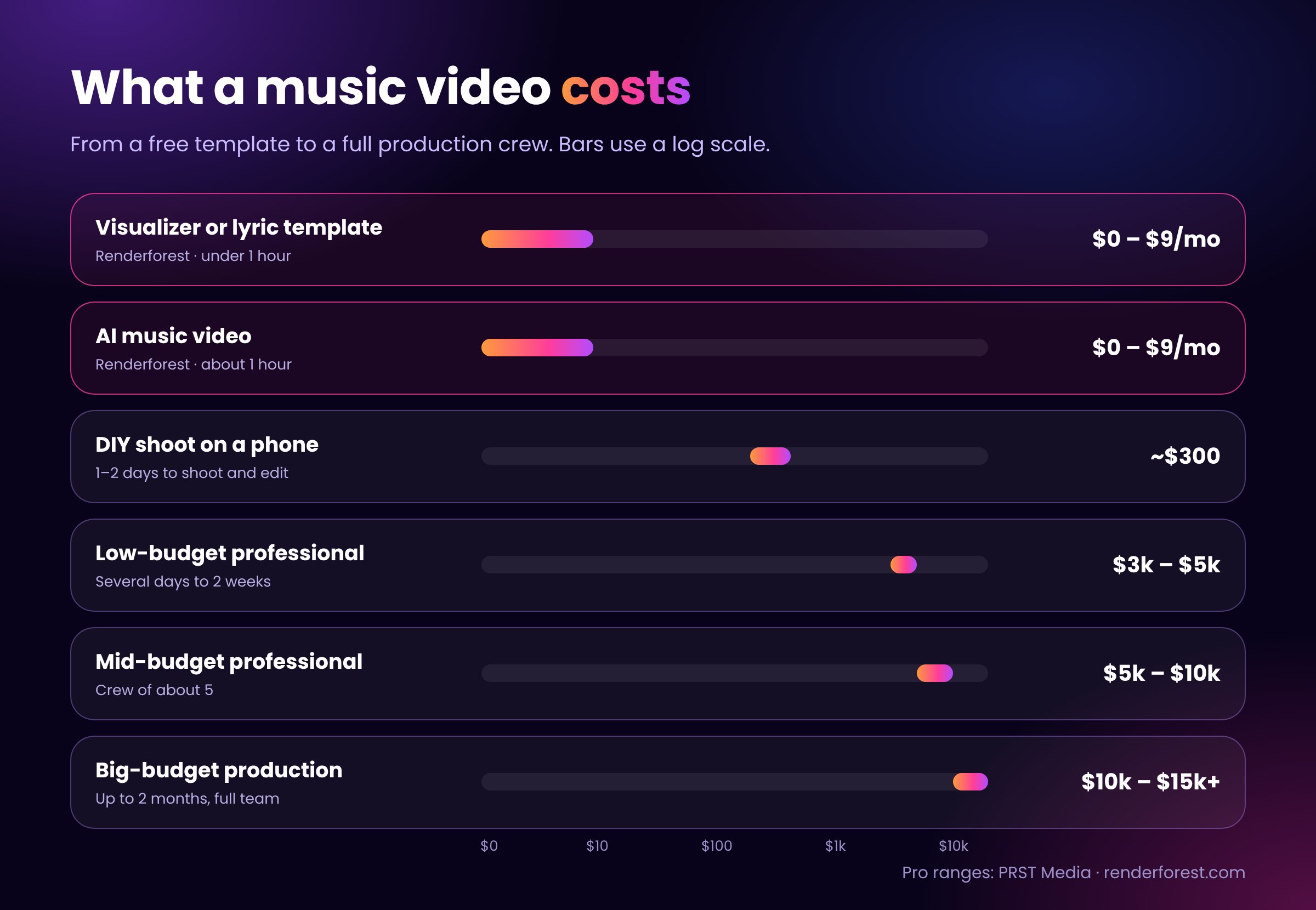
A music video can cost $0 to start with an online tool, around $300 if you shoot it yourself, and $3,000 to $15,000+ with a professional crew. The main cost drivers are crew size, number of shoot days, locations and post-production.
| Approach | Typical cost | Typical time | Skills needed |
|---|---|---|---|
| Visualizer or lyric video template (Renderforest) | Free to start; paid plans from $9/mo billed annually | Under 1 hour | None |
| AI music video (Renderforest) | Free trial scene; paid plans from $9/mo billed annually | About 1 hour | None |
| DIY shoot on a phone | About $300 (food, props, materials) | 1–2 days to shoot and edit | Basic filming and editing |
| Low-budget professional | $3,000–$5,000 | Several days to 2 weeks | Hire a videographer |
| Mid-budget professional | $5,000–$10,000 | 1–2 shoot days, plus planning and post | Crew of about 5 |
| Big-budget production | $10,000–$15,000 and up | Up to 30 days planning, 7 shoot days, 1 month post | Full production team |
Professional cost and time ranges: PRST Media. Renderforest prices: Renderforest, November 2026.
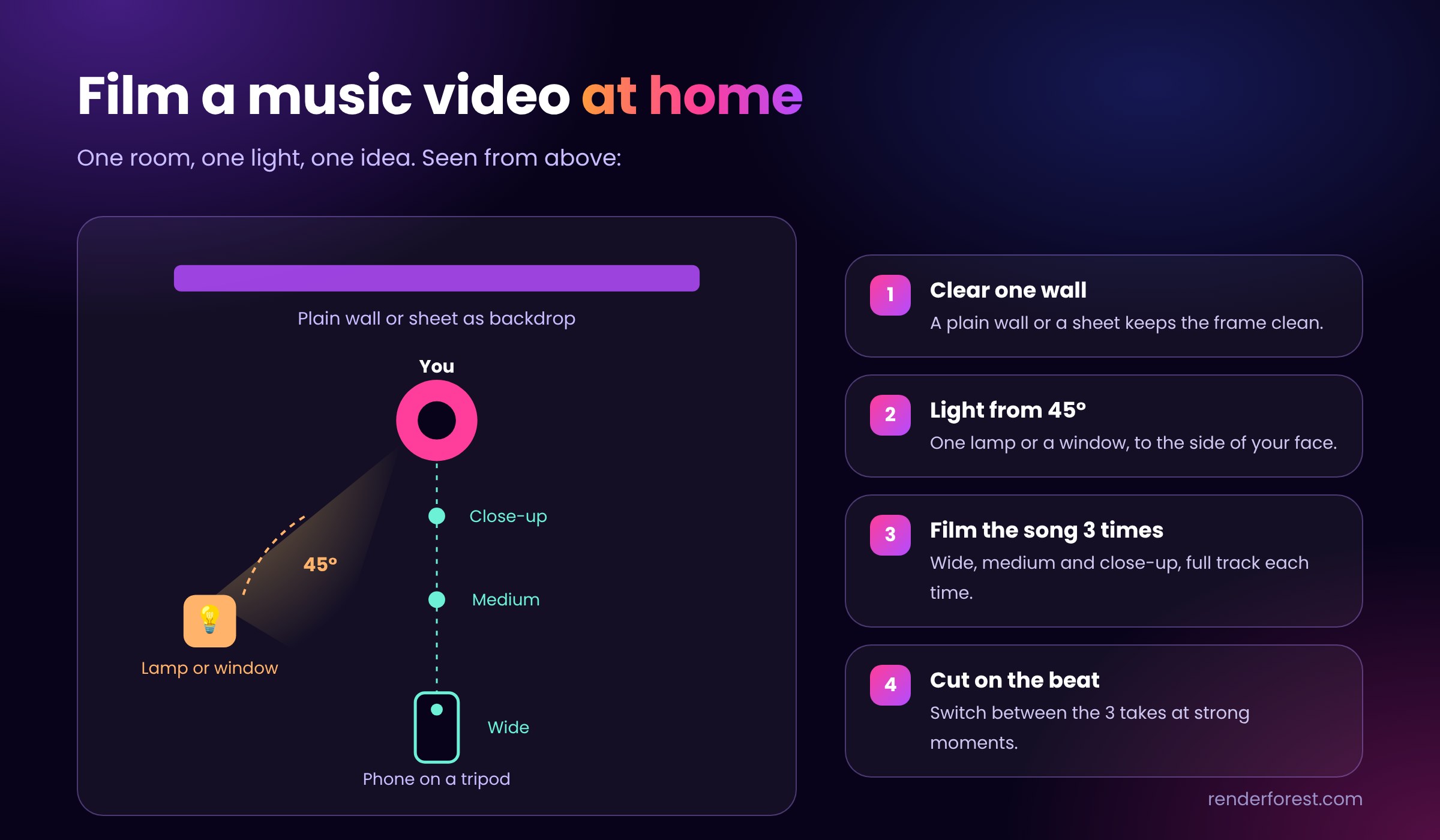
To make a music video at home, use one room, one light source and one idea. Clear a wall or hang a plain sheet as a backdrop, place a lamp or window light at 45 degrees to your face, and film the full song three times: wide, medium and close-up. Cut between the three takes on the beat. If your space doesn’t suit filming, make a lyric video or visualizer instead; both are made entirely on a laptop.
Yes. A recent smartphone shoots 4K video, which is enough for YouTube and every social platform. Lock the exposure, shoot in landscape for YouTube or vertical for TikTok, use natural light or one LED panel, and keep the phone on a tripod or gimbal. You can then edit on the phone or upload the clips to an online editor; Renderforest also has a mobile app.
Start your music video today
You don’t need a crew, a camera or a big budget to release a video with your next single. Upload your track, choose a visualizer, lyric or AI style, and have a video ready for YouTube, Spotify and TikTok the same day. It is free to start with no credit card, and more than 40 million creators have already made their videos with Renderforest.
Choose a concept, write a shot list, film or generate the visuals, edit them to the beat, and export versions for each platform. Without a camera, use a visualizer, lyric video template or AI music video generator.
You need a video editor. For filmed footage, any editor works. To make a video from just a song, use a browser tool such as Renderforest’s music video maker, which needs no editing skills.
Yes. An AI music video generator analyzes your song and creates scenes cut to the beat. You upload the track, add a prompt or reference images, pick a style, then edit the scenes before export.
A template or AI video takes under an hour. A simple self-shot video takes one to two days to film and edit. A professional production takes one to two weeks; big-budget videos can take two months.
Usually the full length of the song, typically 2.5 to 4 minutes. Also cut 15–60 second vertical clips for TikTok, Reels and Shorts, and a 3–8 second loop for Spotify Canvas.
Yes. You can shoot on your phone and edit in a free app, or start free on Renderforest. Free exports are watermarked and for personal use; paid plans remove the watermark and add HD export and a commercial license.
The easiest way is a template. Upload your song to an online music video maker such as Renderforest, pick a visualizer or lyric template, add your cover art and title, and export. It takes under an hour and needs no editing skills.
Yes, on a paid plan. Paid Renderforest plans include a commercial license, so you can publish and monetize the video on YouTube, Spotify and TikTok. Free exports are watermarked and for personal use only.
A music video uses filmed or animated scenes. A lyric video shows the song’s words as animated text. A visualizer shows graphics, such as waveforms or particles, that react to the audio. Lyric videos and visualizers need no filming.
Yes. Export the song as an MP3 or WAV and upload it to an AI music video generator such as Renderforest. The tool analyzes the audio the same way as any other track.
No. Song-to-video tools build the storyboard, generate the scenes and cut them to the beat automatically. You only review the result and replace scenes you don’t like.
It depends on the video. For a full video from one upload, use a song-to-video tool such as Renderforest. For abstract audio-reactive visuals, Neural Frames is a common choice. For hand-built cinematic clips, artists use models such as Kling or Veo.
Share this


Article by: Liana Ziroyan
Liana is a marketing professional with 11 years of experience in digital marketing, content, and product communication. She has a strong eye for visual storytelling and loves turning ideas into engaging campaigns that connect with audiences. With her experience across branding, creative content, and user-focused messaging, Liana enjoys finding simple, effective ways to make products feel clear, useful, and exciting.
Read all posts by Liana Ziroyan