Seedance 2.5 AI Video Generator for Cinematic Films with Sound
ByteDance's Seedance 2.5 generates up to 30 seconds of multi-shot cinematic video in native 4K with stereo audio — cuts, camera moves, dialogue and score in a single pass. It runs inside Renderforest, next to the editor that finishes it: brand kit and templates turn a good clip into a video you can actually publish.
From prompt to published in four steps
- Step 1
Describe your scene — or feed it references
Type a prompt, or add up to 50 reference files — images, video, audio, 3D models and style frames. Seedance 2.5 reads composition, motion and sound from them: one clean image beats fifty adjectives.
Describe your scene — or feed it references - Step 2
Generate multi-shot video with audio
Up to 30 seconds of connected shots in native 4K — cuts, camera moves, dialogue, ambient sound and score generated together and in sync, in one pass rather than stitched.
Generate multi-shot video with audio - Step 3
Compare models, keep the winner
Not sure Seedance nailed it? Re-run the same prompt on Kling 3.0, Veo 3.1 or MiniMax H3 in the same workspace. No new account, no separate credits, no second subscription.
Compare models, keep the winner - Step 4
Edit, brand, publish
Drop the clip into the editor: trim and sequence, apply your brand kit, add subtitles and licensed music, resize for TikTok, Reels and YouTube — then export or publish. Watermark-free on paid plans.
Edit, brand, publish
Start from an AI effect, not a blank prompt
Every effect in the library is a prompt someone has already tuned. Add your own image, hit recreate, and the video is ready in seconds — then run the same idea through Seedance 2.5 when the shot needs several angles and sound.
What Seedance 2.5 does — and what we add
Generally available since July 31, 2026: a unified architecture that generates audio and video together, takes five kinds of reference input, and returns up to 30 seconds of multi-shot footage in native 4K with dual-channel stereo. Here is what that changes in practice.
Multi-shot storytelling in one pass
From one prompt, Seedance plans shots like a director — wide establishing, push-in, reaction cut. One generation plays like an edited sequence, with the same characters and lighting held across all 30 seconds.
Native stereo audio, not a bolt-on
Dialogue with accurate lip-sync, ambient effects and music are generated with the video in dual-channel stereo. Sound lands on cue because picture and audio come from one model — no post-production layering needed.
Fifty reference files, total control
Feed it up to 50 references in one context — images, videos, audio clips, 3D models and style frames. Lock a face, mimic a camera move, match a soundtrack: the model follows your materials, not just your adjectives.
Physics that hold up
Collisions carry weight, fabric tears believably, crowds move like crowds. Seedance has led blind-vote arenas for motion realism since 2.0 — the difference between a cool AI clip and footage you can cut into real work.
Native 4K, every ratio that matters
Generate in 21:9 cinematic, 16:9, 4:3, 1:1, 3:4 or 9:16 vertical — in 4K that is generated rather than upscaled, with 10-bit colour. Resize any result in the editor instead of re-rendering the shot.
Extend and edit by prompt — down to a region
Continue a shot — “keep the camera tracking as she turns the corner” — or repaint one element: an outfit, a prop, a background sign. The rest of the frame stays put, no re-generation.
Seedance 2.0 vs 2.5: what actually changed
Same unified audio-video architecture, a much longer leash. Here is the version jump, spec by spec — and why it matters in the edit.
What Seedance 2.0 gave you
15 seconds, multi-shot
One pass returned up to 15 seconds of connected shots with dialogue, foley and score in dual-channel stereo — the audio-native trick that made the model famous.
12 reference files
Up to 9 images, 3 videos and 3 audio clips steered composition, motion and sound. Enough to lock a face — tight for a whole world.
1080p, edited by prompt
Full-HD output with clip, character, action and storyline edits. You could change an outfit, but you redirected the whole shot to do it.
What Seedance 2.5 adds
30 seconds, one native pass
Double the runway, generated in a single pass rather than stitched — scene continuity and character consistency hold to the last frame.
50 references, five formats
Images, video, audio, 3D models and style frames in one joint generation. Storyboard, character sheet and location scout — one brief.
Native 4K, region-level edits
4K generated rather than upscaled, in 10-bit colour — and you can now repaint one region of the frame while the rest of the shot stays put.
Built for the people who ship video
Match the capability to the work. Every one of these runs on the same plan, next to Kling 3.0, Veo 3.1, MiniMax H3 and Pixverse V6.
Marketers and ad teams → three concepts before lunch
Generate several ad directions in an afternoon, then brand and resize the winner for every placement. Pair it with the AI commercial generator when the campaign needs more than a hero clip.
Filmmakers and storytellers → previz with sound
Block out multi-shot sequences, with audio, before committing a crew or a location. Build the longer cut on the timeline, or step up to the AI movie generator when the piece outgrows 30 seconds.
Social creators → 9:16 with sound, before the trend dies
Native vertical output with generated audio and captions added in the editor, so a trend clip is finished the same day rather than queued behind a sound-design pass.
E-commerce brands → stills into lifestyle shots
Animate a packshot into a lifestyle scene with ambient audio, using image references to keep packaging and labels accurate instead of approximated.
Agencies and teams → every model, one invoice
Client A wants photoreal, client B wants animation. One workspace, every model, shared brand kits, team seats and a single line on the bill.
Coming from Dreamina or CapCut → the finishing half
The official app is a fine place to generate. This is where the clip becomes a video: sequencing, brand kit, subtitles, licensed music and per-platform export, without exporting to a second tool first.
Real prompts, real outputs
Every clip below is Seedance, and the prompt behind it is printed in full. Copy any prompt and run it yourself on 2.5.
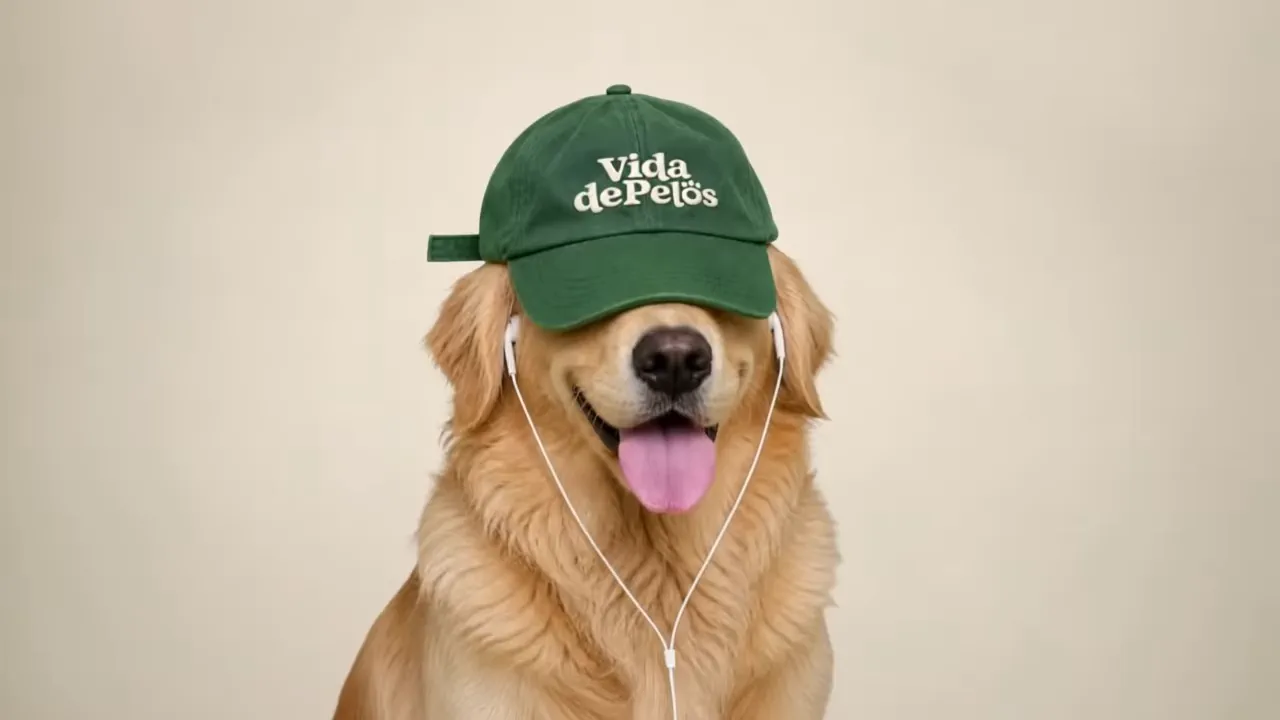
“Cheerful golden retriever in a forest-green ‘Vida de Pelös’ cap and white wired earbuds, vibing to a chill hip-hop beat — rhythmic head bobs, floppy ears, subtle sways, happy panting, tongue licks. Warm cream studio, locked medium close-up, subtle push-in, photorealistic 4K, 24fps, shallow DOF. No dialogue or barking.”
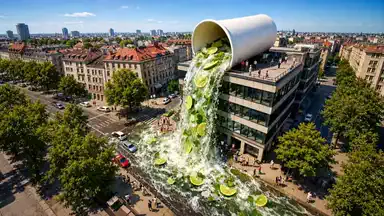
“Surreal sunny city: a giant white ceramic mojito cup tips from a glass rooftop, pouring a huge cascade of bubbly liquid, lime slices and crushed ice onto the street. Tiny pedestrians film and scatter as cars pause. Cinematic drone push-in, warm saturated summer light.”

“Surreal aerial: a dark volcanic peak rises above white clouds as giant hands sift powdered sugar over its summit, creating a delicate ‘snow’ layer. Slow cinematic push-in, bright daylight, photorealistic 4K. ASMR sieve taps, soft powder and wind.”

“Surreal Shanghai: giant clear nail-polish bottle tips from a rooftop, pouring glossy red-orange polish onto the street. It slowly pools as pedestrians stare and film. Drone push-in, bright midday light, photorealistic 4K. ASMR: viscous glug, drips, wet plops, city ambience.”

“Stylized 3D scene: exhausted woman in a giant ‘Monday’ coffee mug, typing on a laptop as steam swirls. She blinks, sighs, rests her head, then lifts it. Cozy desk, warm amber light, cinematic push-in, 4K. ASMR typing, coffee, candle crackle.”

“Fluffy white lamb joyfully leaps across the iconic green Windows XP ‘Bliss’ hills under a deep blue sky. Red ‘leap into joy’ text pops in letter-by-letter. Wide locked shot, sunny saturated colors, 4K. Sounds: breeze, birds, boing leaps, playful ukulele.”
Closed model, official APIs. Here it just works.
Access status
- Seedance 2.5 · generally available July 31, 2026 · ByteDance
- Closed model — no public weights, so it cannot be run locally
- Official routes: ByteDance's Dreamina and CapCut apps, plus the BytePlus API
- There is no standalone seedance.com — lookalike sites are not official
- On Renderforest: included in paid subscriptions, not a free tool
- Announced June 23, 2026 · API rollout from July 16 · live here through official channels
Seedance 2.5 is not an open model and there is no offline version of it. Every legitimate route to it is a hosted one, which makes the only real question where you run it — and what you are left holding afterwards.
What “free” actually means for this model.
Nowhere runs Seedance 2.5 for nothing, and pages promising otherwise are usually selling credits. ByteDance's Dreamina app hands out limited trial credits and then charges through VIP tiers; API resellers bill per second of output. On Renderforest, Seedance 2.5 sits inside the paid subscription rather than behind a credit meter: generations do not draw down a daily allowance, the same plan covers every other model we host, and paid plans carry commercial rights with no watermark.
You cannot download it — and that is not a limitation of this page.
There are no public weights for Seedance 2.5, so no local install, no ComfyUI node and no offline build exists. Any site offering one is not offering the real model. Cloud access through a platform that also edits is the practical way to work with it, which is the whole reason this page exists.
Where the official app is the better answer.
Dreamina gets ByteDance features first, because it is ByteDance's own app. If you only ever need raw clips and you already live inside CapCut, that is a reasonable place to be. Renderforest is for the case where the clip has to become a finished, on-brand video — sequenced, subtitled, scored, resized and published — without leaving the tab it was generated in.
Everything about Seedance 2.5

Clients Served
Projects Created

Positive Reviews
Loved by Creators
If you're looking for the best AI video creation tool, just try Renderforest. It's the only option that produces videos 100% true to your prompt and the reference images you add.
Short learning curve and very intuitive. I created a product explainer video a couple of hours after signing up, with no video editing knowledge.
I love using Renderforest for creating intro and AI videos. Everything is fast and works exceptionally well, especially the video quality.
With the AI tools they added, you can create a professional commercial for your business or brand just by typing a script.
I love the AI feature of Renderforest — that is just awesome. And I can make eye-catching reels using the AI reels maker.
Renderforest offers a diverse range of options for editing our videos with AI or manually. Unlike other AI tools, it's cost-effective and efficient.
The new AI features are awesome. Using image to video, I created beautiful short animations with my kids' book characters.
I don't come from a video production background, but the platform turns my scripts into clear, professional videos without any hassle.
A leap in the quality of our campaigns. With this speed of production, we serve retail clients with media on par with large ad agencies.
The AI features are very impressive. These tools make the creation process even faster and smarter, especially for video and branding content.
I've been using Renderforest for my video creation needs and I'm beyond impressed. The variety of templates is fantastic. A solid 5 stars!
The user-friendly interface, wide template collection, extensive customization options and fast rendering speed make my creative work achievable.
Hundreds of videos later, I'm continually impressed with the quality of the results. The best money I've spent in 30 years of marketing.
I'm dedicated to audiovisual creation, and Renderforest helps me create professional-level work quickly and simply. Fast, simple and pro.
One subscription. Every model. No credit math.
- Seedance 2.5
- Kling 3.0
- Veo 3.1
- MiniMax H3
- Pixverse V6
- Renderforest Fast
Seedance 2.5, Kling 3.0, Veo 3.1, MiniMax H3 and Pixverse V6 — plus the full editor, 1200+ templates, brand kit and stock library — under one predictable plan. No daily credit resets, no pay-per-second arithmetic, no watermark on paid plans, and the next breakthrough model joins at no extra cost.
Frequently asked questions
What is Seedance 2.5?
Seedance 2.5 is ByteDance's AI video generation model, generally available since July 31, 2026. It generates up to 30 seconds of multi-shot video in native 4K with synchronised audio — dialogue, sound effects and music — from text and up to 50 reference files spanning images, video, audio, 3D models and style frames. It is known for realistic motion and physics, director-style camera control, and generating picture and sound in a single pass.
Is Seedance 2.5 free to use?
No — Seedance 2.5 is a premium model wherever you run it. ByteDance's Dreamina app offers limited free trial credits before moving you onto VIP tiers, and API resellers bill per second of output. On Renderforest, Seedance 2.5 is included in paid subscriptions: one flat plan covers it and every other model we host, with no daily credit resets, no per-second billing, and no watermark or licensing limits on paid plans.
Does Seedance 2.5 generate audio?
Yes — that is its standout feature. Audio and video are generated together by one model: lip-synced dialogue, ambient effects, foley detail and music in dual-channel stereo, aligned to the visuals. Because both come out of the same pass, impacts and lip movement are synchronised rather than approximated — and 2.5 tightens lip-sync further. You do not need to add sound in post, though you can still swap in licensed music from our library.
How long can Seedance 2.5 videos be?
A single generation runs up to 30 seconds — natively, in one pass, not stitched from segments — and can contain several shots with natural cuts between them. For anything longer, sequence multiple generations on the Renderforest timeline — you can cut Seedance shots together with Kling 3.0 or Veo 3.1 shots in one project — or use the model's extension capability to continue a shot.
What's the difference between Seedance 2.5 and Kling 3.0?
Broadly: Seedance 2.5 excels at natural motion, multimodal references and one-prompt multi-shot generation with native audio at up to 30 seconds; Kling 3.0 offers structured shot-by-shot storyboarding and strong character locking across longer sequences. The practical answer is to test both per project — in Renderforest you can run the same prompt through each on the same plan and keep the better result.
Can I use Seedance 2.5 for commercial projects?
Yes. Videos generated and edited in Renderforest on a paid plan come with commercial usage rights and no watermark, and the built-in music library is licensed too — so the finished, branded video is safe to publish and promote. Platforms including YouTube and Meta ask creators to label realistic AI-generated footage, which is worth doing regardless of which model produced it.
What is the official Seedance 2.5 website?
ByteDance offers Seedance 2.5 through its own Dreamina and CapCut apps and through the BytePlus API. There is no standalone seedance.com, and ByteDance has warned that several lookalike sites are unofficial. Renderforest accesses the model through official API channels and is transparent about it: we are the production studio around the model, not ByteDance.
Can I run Seedance 2.5 locally?
No. Seedance 2.5 is a closed, cloud-hosted model — there are no public weights to download, so there is no local install, no ComfyUI node and no offline build. Any site promising an offline version is not offering the real model. Cloud access through a platform that also edits is currently the most practical way to work with it.
What's new in Seedance 2.5 compared to 2.0?
Four things, all substantial: native clip length doubles from 15 to 30 seconds in a single pass; reference intake grows from 12 files to 50 and adds 3D models and style frames; output moves from 1080p to native 4K with 10-bit colour; and region-level editing lets you change one part of the frame without regenerating the shot. Lip-sync and audio timing also tighten. Renderforest serves Seedance 2.5 today, on the same plan as every other model we host.
Do I need editing skills to get a finished video?
No. Generations drop straight into a template-driven editor with auto-subtitles, a one-click brand kit, licensed music and per-platform resizing. If you can write a prompt, you can ship a branded video — and if you would rather start from a finished layout, there are over 1200 templates to drop the clip into.
Your next 30 seconds of film are one prompt away.
Generate with Seedance 2.5, compare it against Kling 3.0, and leave with a finished, branded video — all in one Renderforest tab.
Generate with Seedance 2.540M+ creators · One subscription, every model · No watermark on paid plans