AI Ad Generator
Renderforest's AI ad generator lets you turn your ideas into professional video ads in minutes. It's easy to use, reliable, and smart enough to adjust each ad to your goals.
Create your ad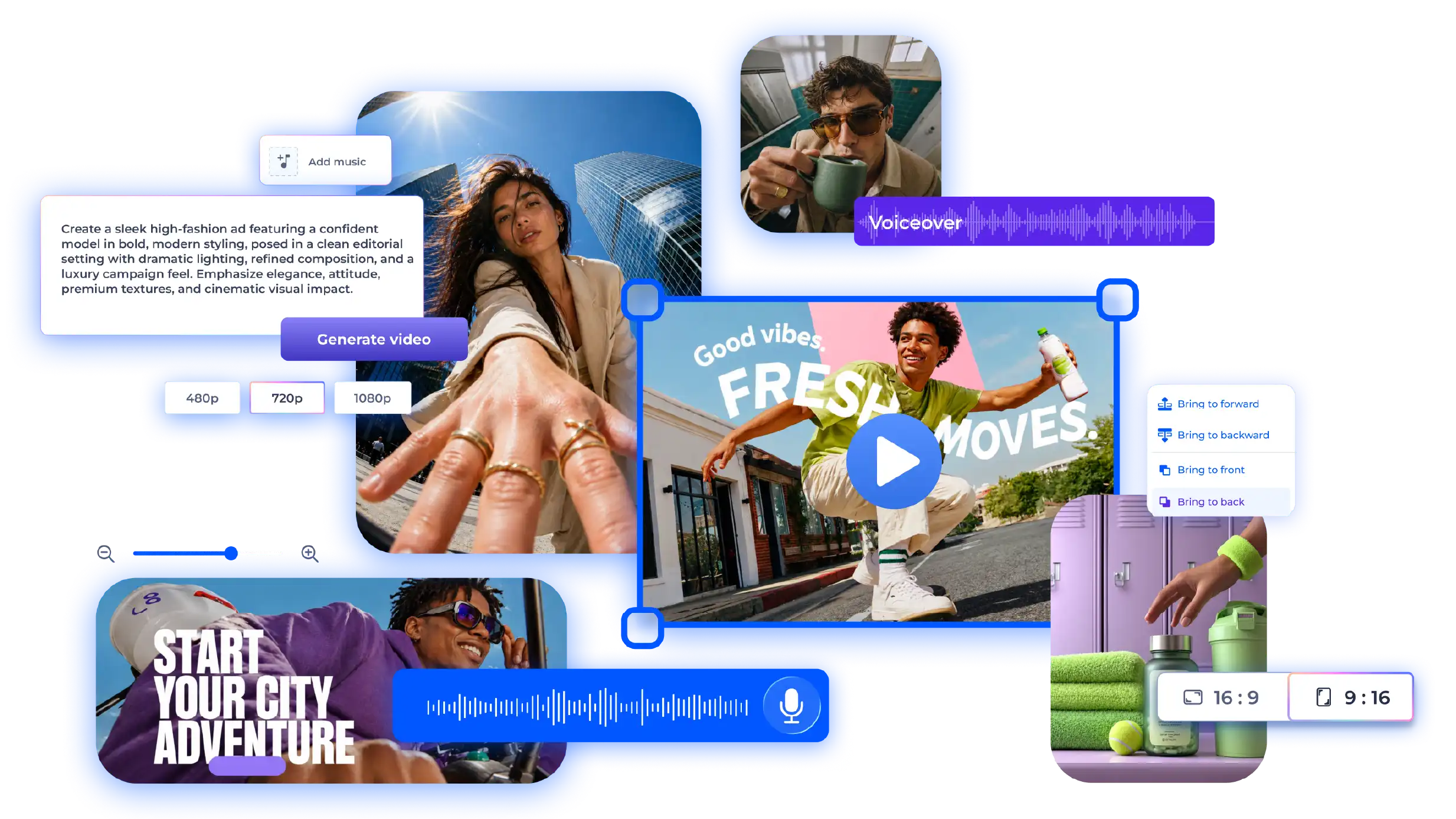
Trusted by teams and creators worldwide


Why teams use Renderforest's AI ad generator
Choose your AI style
With animated, realistic, and image-based styles, you can make any idea work. Pick the tone that suits you best and create ads that look great and speak to your audience naturally.
Explore stylesHow Renderforest's AI video ad generator works
Input idea & choose style
Type in your idea or click "Inspire me" for a random one. You can also "Enhance script" to polish what you've written. Then pick a style (animated, stock-based, AI-generated, or image-driven) and hit Next.
Customize & generate
Choose your video type, language, and screen size. You can adjust details yourself or let AI pick what fits best. Once you're ready, click Generate, and watch your idea turn into a full video.
Download & finalize
Download your video or grab the link to share it. Want to tweak it first? Open it in the editor to adjust text, add music or voiceovers, and change visuals before exporting your final version.
Powerful features behind every ad

Template-based video creation
Renderforest uses professional animation templates chosen by AI to match your script. It builds professional, ready-to-use videos in minutes with layouts and transitions already optimized for ad performance.
Stock video-based creation
The system automatically selects and arranges stock footage that fits your content. It adds transitions, color balance, and pacing adjustments to produce realistic, high-quality videos in minutes.
AI image-packed video creation
AI generates custom visuals from user input and blends them with expert motion design for dynamic, unique videos.
Generative AI-driven video creation
Renderforest's AI turns plain text into a complete animated story. It creates scripts, scenes, and characters, giving you full control from start to finish.
Smart edit with natural prompts
You can change visuals, scenes, or pacing simply by describing what you want. The AI updates your video instantly, removing the need for complex manual edits.
Built-in AI editing suite
All editing, voiceovers, and exports happen inside Renderforest. You can generate, adjust, and finalize videos in one place without switching between different tools or software.
Who our AI ad maker is for

Content creators
Content creators
Creators can make videos in minutes, keeping their channels active and their content looking professional without hours of editing.

Marketing teams
Marketing teams
Marketing teams can build and update campaign videos quickly, test new ideas, and keep every version on brand.
Educators and trainers
Educators and trainers
Teachers and trainers can create short videos that explain complex topics simply and hold learners' attention.

Small business owners
Small business owners
Small business owners can easily make professional-quality product or service videos to help attract new customers.

Startups
Startups
Startups can present new products, pitch ideas, or share updates fast, even without a big budget or production team.

Non-technical users
Non-technical users
Anyone can make professional-looking ads with just a few clicks; no editing skills or special software needed.
Editors and production teams
Editors and production teams
Editors and production teams can use AI tools to cut routine work in half and focus more on creativity and fine-tuning.
What our customers say about us
See Why They Love It
AI ad generator FAQ
How can I create AI video ads with Renderforest?
To make an AI video ad, simply describe your idea or paste your script into the tool. Then, choose a video style such as animated, realistic, or image-based, and click Generate. The AI creates your ad automatically, which you can then edit or download right from your browser.
Can I generate ads from a script or product link?
You can start with either a written script or a product link. The AI reads your text or scans the product page to understand your message, then builds a full video with matching visuals, text, and transitions based on that information.
Do I need to film or upload footage to make AI ads?
There's no need to film or upload your own footage to make AI ads. The AI ad generator uses built-in templates, stock clips, and AI visuals to create complete, professional-quality videos without needing a camera.
How do I edit or customize AI-generated ad videos?
Once your video is generated, you can open it in the Renderforest editor to make changes. You can rewrite text, change visuals, adjust timing, add transitions, and include your own music or AI voiceover before downloading the final version.
Can I use the AI video ad maker for social media campaigns?
The AI video ad maker is perfect for social media. It automatically adjusts video sizes for platforms like Instagram, TikTok, Facebook, and YouTube, so your ad looks great and fits each format.
Is the Renderforest AI ad generator free to use?
You can create and preview AI videos for free using the basic plan. For high-quality downloads, watermark removal, or access to premium features, you can upgrade to one of the paid subscription options.
What makes Renderforest different from other AI ad makers?
Renderforest stands out among other AI ad makers because it combines AI-powered video creation with a full editing suite. You can generate, customize, and export videos all in one place, without switching between apps or needing extra tools.
Can I add my own logo, voiceover, or brand elements?
You can upload your logo, apply brand colors, and add your own voiceover or music track. The tool helps you keep every video consistent with your brand's look and tone.
Does the AI ad generator support multiple languages?
Renderforest supports many languages for both text and voiceovers. You can choose a preferred voice style and accent, making your videos suitable for international audiences.
Do I need to download any software to create AI ads online?
Everything works directly in your web browser. You can create, edit, and export videos online without installing any additional software or apps.