








E-commerce sellers
Every product page becomes a 30-second promo with the product's own photos.
Paste a product pageA product page, blog post, shared Google Doc or your Instagram account becomes a 5-second to 10-minute video with voice-over, captions and music.
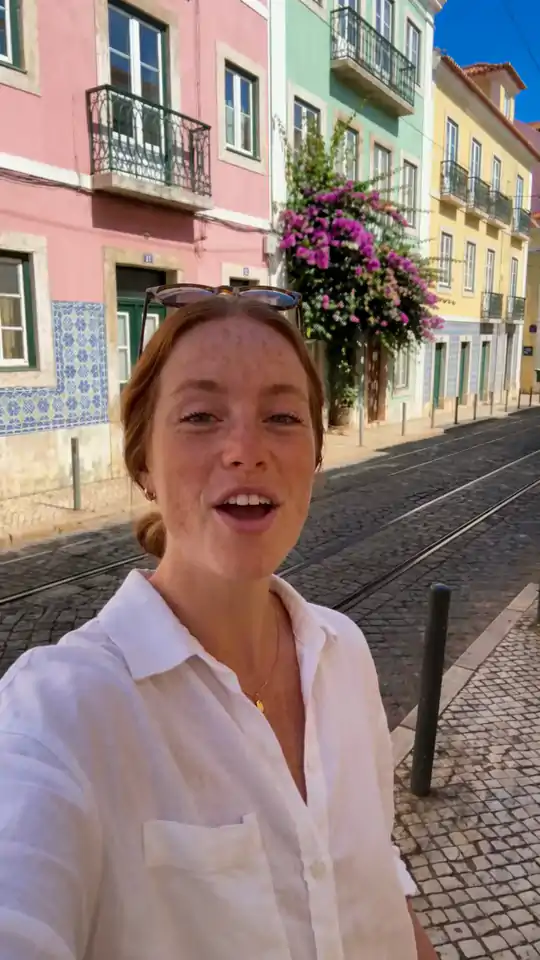
We pasted the link to a product page. Renderforest found the photos and clips on it, checked the facts against other sources, wrote a 30-second script, matched each line to an asset, added a narrator, captions and music, and rendered a vertical promo. Every line and asset stays editable.
Five cities, one trip. Made from a blog article · 15s · 9:16
Pick a kind of link, from a product page or a blog post to a property listing or an app store page. The preview shows the video it turns into, scene by scene, with the length and format that suit it.
The photos become the shots, the bullet points become the script, the price and the offer become the end card: a product promo in 15 to 30 seconds.
Headline, features and screenshots in order, with the logo on the end card: a website explainer video or a launch promo for your landing page.
The article's key points, one per scene, with its own images where it has them and generated scenes where it doesn't. For Shorts, Reels and YouTube.
Step by step, screenshots in order, calm narration. Turn a knowledge-base page into a walkthrough your users can watch instead of read.
The listing's photos in a walk-through order, the facts spoken, the agent's details on the end card. A vertical tour from one link.
Screenshots, the one-line pitch, the store badge. An app promo that shows the product exactly as the store page sells it.
The date, the place, the three reasons to come and the link. A 15-second announcement for stories and feeds.
The facts in order, with research for context. Illustrative scenes are flagged so you know which shots were generated.
Paste your Instagram account link instead of a web page. Renderforest reads the public profile and its posts, uses your own photos and videos, writes the script and renders a new video with voice-over and captions, ready to post as a Reel or anywhere else.
Copy instagram.com/your.brand from the app or the browser. Public accounts only.
Your bio, posts and captions become the facts; your photos and clips become the scenes.
Vertical 9:16 for Reels and Stories, or 16:9 for YouTube and your site, from 5 seconds to 10 minutes.
Any public page works: a product page, landing page, blog post, help article, listing or app page. Behind a login? Paste the text instead.
Renderforest reads the page, pulls its photos, videos, logo and colours, and researches what it leaves out. Untick anything you don't want.
Pick promote, explain, demo, recap, tour or announce; 5 seconds to 10 minutes; 16:9 or 9:16; voice-over in 20 languages or music only.
See the credit cost before you generate. Every scene, line, asset and caption stays editable. Download an MP4: 720p free, 1080p on paid plans.
Generate AI video from an Instagram account, a Telegram channel, a blog article, a product website or a shared Google Doc.
"URL to video", "link to video" and "website to video" all mean one thing: making a new video from a web page. Three other tools share the words.
Every product page becomes a 30-second promo with the product's own photos.
Paste a product pageThe landing page becomes the launch video; the changelog becomes the update video.
Paste a landing pageEach article becomes a Short, a Reel and a YouTube recap, in the article's own language or Hindi, Spanish or Arabic.
Paste a blog postA listing becomes a vertical tour with the facts spoken.
Paste a listingThe store page becomes the app promo, screenshots included.
Paste an app pageA client's whole site, one page at a time, in a consistent style.
See team plansThe photos and videos on a page belong to whoever published them. Your own pages, your clients' pages with permission, and content you licensed are fine; a competitor's page is not.
Amazon, eBay and Etsy restrict automated reading of their listings; sellers own their own images and can upload them directly.
When a video shows realistic AI-generated scenes of people, places or events, YouTube, TikTok and Meta ask you to label it. Scenes made from your real photos and videos don't need the label.
A URL to video AI reads a web page and makes a new video about it. It extracts the page's text, images and videos, writes a script from them, matches each line to a photo, clip or generated scene, adds narration, captions and music, and renders a finished video. It does not download a video from the link.
People use it to turn a product page into a promo, a landing page into an explainer, a blog post into a narrated recap, a listing into a tour or an app page into a short ad, without a shoot and in any of 20 narration languages. It is not a downloader and not a screen recording: the comparison table above draws the line between the three tools that share the name.
Paste the link, review the photos, videos, logo and facts Renderforest finds on the page, choose what the video should do, pick a length from 5 seconds to 10 minutes and a format, choose a voice, and generate. The script and the credit cost always show before anything is charged.
Pages with real photos and structured facts work best. Pick the length by platform: 15 to 30 seconds for Reels, TikTok and Shorts, 60 to 90 seconds for a landing page explainer, 2 to 5 minutes for a tutorial. Standard generation is queued and can take a few hours; Priority renders in minutes at about 1.5 times the credits.
They are synonyms: a tool that makes a new video from a web page. Some tools that share the name do something else. A video downloader saves a clip that is already on a page. A scroll-and-capture converter records the page as a silent screen capture. A URL-to-ad tool makes short avatar ads from a product link.
If you searched for a converter because you want to save a video that is already on a page, you need a downloader and the right to save that clip. If you want a new narrated video about the page, made from its own photos, videos and facts, that is what this tool does.
Best: pages with real photos, a clear headline and structured facts, such as product pages, landing pages, listings, help articles and blog posts with images. Image-heavy pages with little text still work: the script leans on research and the scenes are generated to match.
Long articles are summarized to the length you choose. Pages behind a login or paywall, and pages that block automated reading, can't be used as a link: paste their text instead and upload the assets you own, and the video is built the same way.
Yes, two ways. This tool makes a product promo from the product page: the first shot is the product, the price or offer is spoken and shown, and the end card carries your logo and link. For hooks, variants and whole ad sets from the same link, use the Renderforest AI Ad Generator.
Both start from the same page and end in the same editor, so you can make the promo here and the ad set there without redoing the brief.
A blog to video recap takes the hook from the title and one point per scene, uses the article's own images where it has them, and ends with a question. Run 45 seconds for Shorts and Reels or 2 to 3 minutes for YouTube, narrated in the reader's language, for example a Hindi recap of an English post.
Recaps of your own articles with your own script and visuals are original content. Mass-produced summaries of other people's articles are not, and platforms treat them accordingly: repurpose what you wrote.
A fair checklist: does it use the page's own images and videos or only stock; does it show you what it found before charging; can you set the length and format first; can you edit the script and every scene; does it narrate in your market's language with a native voice; is the price visible before you click; does it tell you which pages it can't read.
Renderforest's answer to each is on this page: the page's own assets with generated scenes only for the gaps, a visible script and per-second price before generation, 5 seconds to 10 minutes in 16:9 or 9:16, 20 narration languages, and a plain list of what stays out.
Videos are priced by the second on a credit system, and the cost shows on the button before you click. Paid plans include your generations on the Renderforest models with no per-second billing, 1080p export and a commercial licence.
Three plans, one price each, billed annually.
A URL to video AI reads a public web page and makes a new video about it: it extracts the text, images and videos, writes a script, matches each line to a photo, clip or generated scene, and adds narration, captions and music. In Renderforest you paste the link, review what it found, choose the length and the voice, and get an editable video. It does not download a video from the link.
Paste the link into the panel above. Renderforest reads the page, shows the photos, videos, logo and facts it found, and researches what the page leaves out. Choose what the video should do (promote, explain, recap, tour), the length (5 seconds to 10 minutes), 16:9 or 9:16, and a voice. Generate, edit any scene, and download the MP4.
Not here. Renderforest's URL to video tool makes a new video from a page; it never saves the videos that are already on it. If you want to keep a clip from a page, you need a downloader and the right to save that clip. If you want a promo, explainer or recap of the page, this is the tool.
Both names mean the same thing: a tool that turns a web page into a video. Some converters are screen recorders that film a page scrolling, and some link-to-video tools are downloaders. Renderforest makes a narrated video from the page's own assets, research and generated scenes, which you can edit.
Starting is free: you can make your first videos on Renderforest Fast, the model included with every account. Longer videos, Renderforest Pro and the premium models, 1080p export and the commercial licence are on paid plans, which include your generations with no per-second billing.
Pages with real photos, a clear headline and structured facts: product pages, landing pages, listings, help articles and blog posts with images. Image-heavy pages with little text still work (the scenes are generated); login walls, paywalls and pages that block automated reading don't, so paste the text and upload your own assets instead. Public Telegram channels work too: paste the channel's link.
Yes. You see every usable photo, screenshot, video hosted on the page, the logo and the brand colours that were found, and you leave out anything you don't want used. Prices, specs and headline numbers go into the script; the logo and the link go on the end card. Other people's embedded social videos are not used.
Yes. You see the script with the asset planned for each scene; rewrite any line, reorder scenes or ask for a different angle before you generate. After generation every scene, caption, asset and the music stay editable in the Renderforest editor.
Yes, before you generate: 5 seconds to 10 minutes, and 16:9 for YouTube and the web or 9:16 for Reels, TikTok and Shorts. A 30-second cut and a 2-minute cut of the same page are two separate videos that reuse the same assets.
20 languages with native voices, including English in US, UK, Indian and Australian accents, Hindi, Arabic, Spanish, French, Portuguese, German, Italian, Japanese, Russian, Turkish, Urdu, Bengali, Indonesian and Malay, plus multilingual voices, or no voice-over at all. The language is detected from the page and can be changed.
Stores with public product pages, such as Shopify shops, work directly. Marketplaces like Amazon and Etsy restrict automated reading of their listings; if you are the seller, upload your own product photos and paste the listing text, and the video is built the same way.
Yes. This tool makes a product promo from the product's own photos with the offer spoken and shown; for hooks, variants and ad sets from the same link, use the Renderforest AI Ad Generator. Both start from the same page and end in the same editor.
Yes. Paste the article; the recap takes one point per scene, uses the article's images where it has them and generated scenes where it doesn't, and runs 45 seconds for Shorts and Reels or 2 to 3 minutes for YouTube, narrated in any of 20 languages.
The logo and brand colours come from the page and sit on the end card; replace them in the editor if you prefer. You can also add an AI avatar presenter, your cloned voice or your own music in the editor.
You do, for pages you have the right to use. Videos made on a paid plan come with a commercial licence for marketing, social, ads and client work. The photos and videos on the page stay their owner's; use your own pages or pages you have permission for.
Reading the page takes seconds. A 30-second video renders in minutes on Priority generation and can take a few hours in the Standard queue; longer videos take longer. You can keep working in the editor while a Standard render waits.
Yes. Paste the page and choose Explain it or Recap the article: Renderforest summarizes the page into a script of the length you pick (5 seconds to 10 minutes), matches each point to the page's own images or a generated scene, and narrates it. For a plain text summary without a video, a summarizer is the better tool; this makes something you can post.
Photos, videos, facts and a voice-over, in one finished video you can edit.